<?xml version="1.0" encoding="utf-8"?><feed xmlns="http://www.w3.org/2005/Atom" ><generator uri="https://jekyllrb.com/" version="4.4.1">Jekyll</generator><link href="https://dongbum.io/feed.xml" rel="self" type="application/atom+xml" /><link href="https://dongbum.io/" rel="alternate" type="text/html" /><updated>2026-06-11T12:13:13+09:00</updated><id>https://dongbum.io/feed.xml</id><title type="html">DONGBUM on blog</title><subtitle>C++ 개발과 프로그래밍</subtitle><author><name>DONGBUM KIM</name></author><entry><title type="html">apt upgrade 중 Ubuntu Pro 안내가 나올 때 의미와 등록 방법</title><link href="https://dongbum.io/2026/06/09/get-ubuntu-pro" rel="alternate" type="text/html" title="apt upgrade 중 Ubuntu Pro 안내가 나올 때 의미와 등록 방법" /><published>2026-06-09T09:00:00+09:00</published><updated>2026-06-09T09:00:00+09:00</updated><id>https://dongbum.io/2026/06/09/get-ubuntu-pro</id><content type="html" xml:base="https://dongbum.io/2026/06/09/get-ubuntu-pro"><![CDATA[<p>우분투 서버에서 <code class="language-plaintext highlighter-rouge">apt upgrade</code>를 실행하다 보면 가끔 Ubuntu Pro 관련 안내 문구가 나타날 때가 있다. 처음 보면 패키지 업데이트에 문제가 생긴 것처럼 보이지만, 실제로는 추가 보안 업데이트 제공 여부를 알려주는 메시지다.</p>

<p>이번 글에서는 이 메시지의 의미와, 필요할 경우 무료 개인 구독을 등록하는 방법을 정리해보겠다.</p>

<p>내가 확인한 메시지는 다음과 같다.</p>

<div class="language-bash highlighter-rouge"><div class="highlight"><pre class="highlight"><code>ubuntu@instance-1:~<span class="nv">$ </span><span class="nb">sudo </span>apt upgrade
Reading package lists... Done
Building dependency tree... Done
Reading state information... Done
Calculating upgrade... Done
Get another security update through Ubuntu Pro with <span class="s1">'esm-apps'</span> enabled:
  rclone
Learn more about Ubuntu Pro at https://ubuntu.com/pro
The following upgrades have been deferred due to phasing:
  fwupd libjcat1 libxmlb2
0 upgraded, 0 newly installed, 0 to remove and 3 not upgraded.
ubuntu@instance-1:~<span class="err">$</span>
</code></pre></div></div>

<p>눈에 띄는 부분은 이 문장이다.</p>

<blockquote>
  <p>Get another security update through Ubuntu Pro with ‘esm-apps’ enabled: rclone</p>
</blockquote>

<p>이 메시지는 현재 시스템에 설치된 <code class="language-plaintext highlighter-rouge">rclone</code> 패키지에 대해 추가 보안 업데이트가 준비되어 있지만, 그 업데이트는 Ubuntu Pro의 <code class="language-plaintext highlighter-rouge">esm-apps</code>를 활성화해야 받을 수 있다는 뜻이다.</p>

<p>참고로 바로 아래의 <code class="language-plaintext highlighter-rouge">The following upgrades have been deferred due to phasing</code>는 별개의 메시지다. <code class="language-plaintext highlighter-rouge">fwupd</code>, <code class="language-plaintext highlighter-rouge">libjcat1</code>, <code class="language-plaintext highlighter-rouge">libxmlb2</code>가 단계적 배포(phasing) 때문에 잠시 보류되었다는 의미이지, Ubuntu Pro와 직접 관련된 것은 아니다.</p>

<p>Ubuntu Pro는 Canonical이 제공하는 확장 보안 유지보수 서비스다. 공식 문서 기준으로 개인 사용자는 최대 5대까지 무료로 사용할 수 있고, Ubuntu Community Member라면 최대 50대까지 무료 혜택을 받을 수 있다. 필수는 아니므로 그냥 넘어가도 된다. 다만 보안 업데이트 범위를 넓히고 싶다면 등록해두는 편이 좋다.</p>

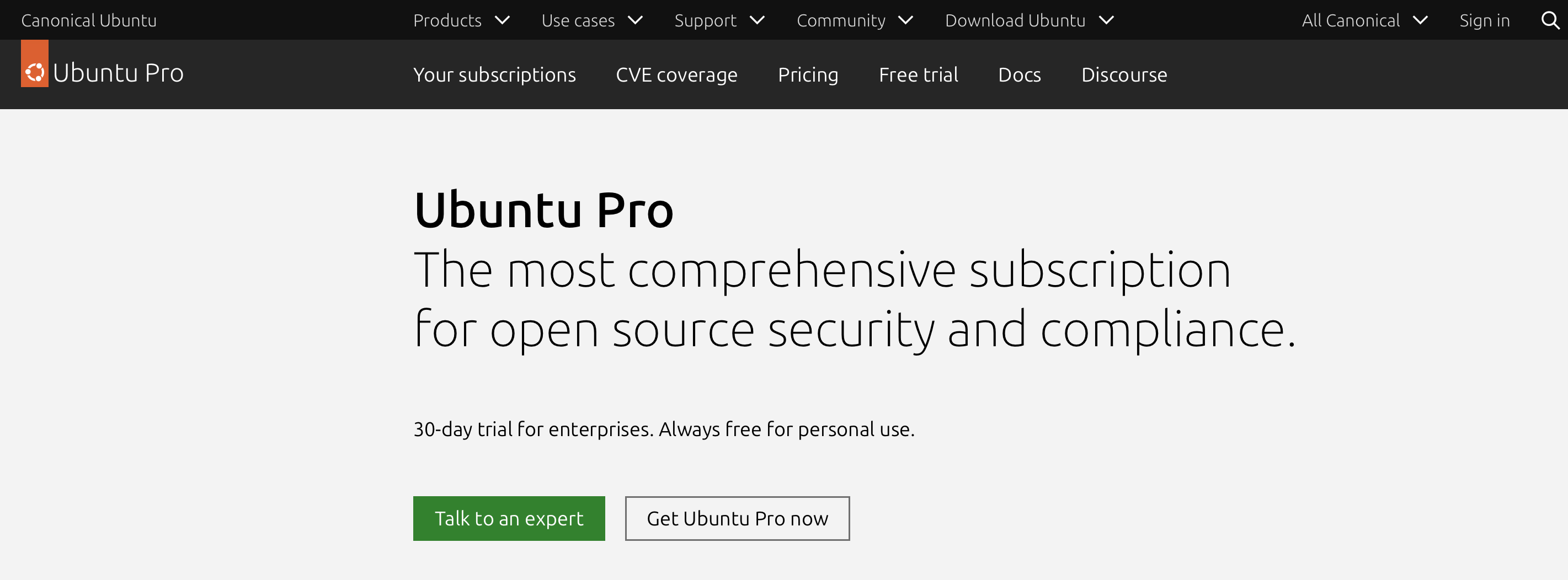
<p>먼저 <a href="https://ubuntu.com/pro">Ubuntu Pro</a> 페이지에 접속해서 <code class="language-plaintext highlighter-rouge">Get Ubuntu Pro now</code> 버튼을 클릭한다.</p>

<p><img src="/assets/images/ubuntu-pro-1.png" alt="" /></p>

<p>Ubuntu Pro의 주요 기능은 다음과 같다.</p>

<ul>
  <li><code class="language-plaintext highlighter-rouge">esm-infra</code>: Ubuntu Main 저장소 패키지에 대한 보안 유지보수 기간 연장</li>
  <li><code class="language-plaintext highlighter-rouge">esm-apps</code>: Universe 저장소를 포함한 더 넓은 범위의 패키지 보안 업데이트 제공</li>
  <li><code class="language-plaintext highlighter-rouge">livepatch</code>: 재부팅 없이 커널 보안 패치 적용 가능</li>
  <li>각종 보안 컴플라이언스, 감사, 관리 도구 제공</li>
</ul>

<p>즉, 기본 LTS 지원만으로는 놓칠 수 있는 패키지까지 보안 업데이트 범위를 넓혀주는 서비스라고 이해하면 된다.</p>

<p><img src="/assets/images/ubuntu-pro-2.png" alt="" /></p>

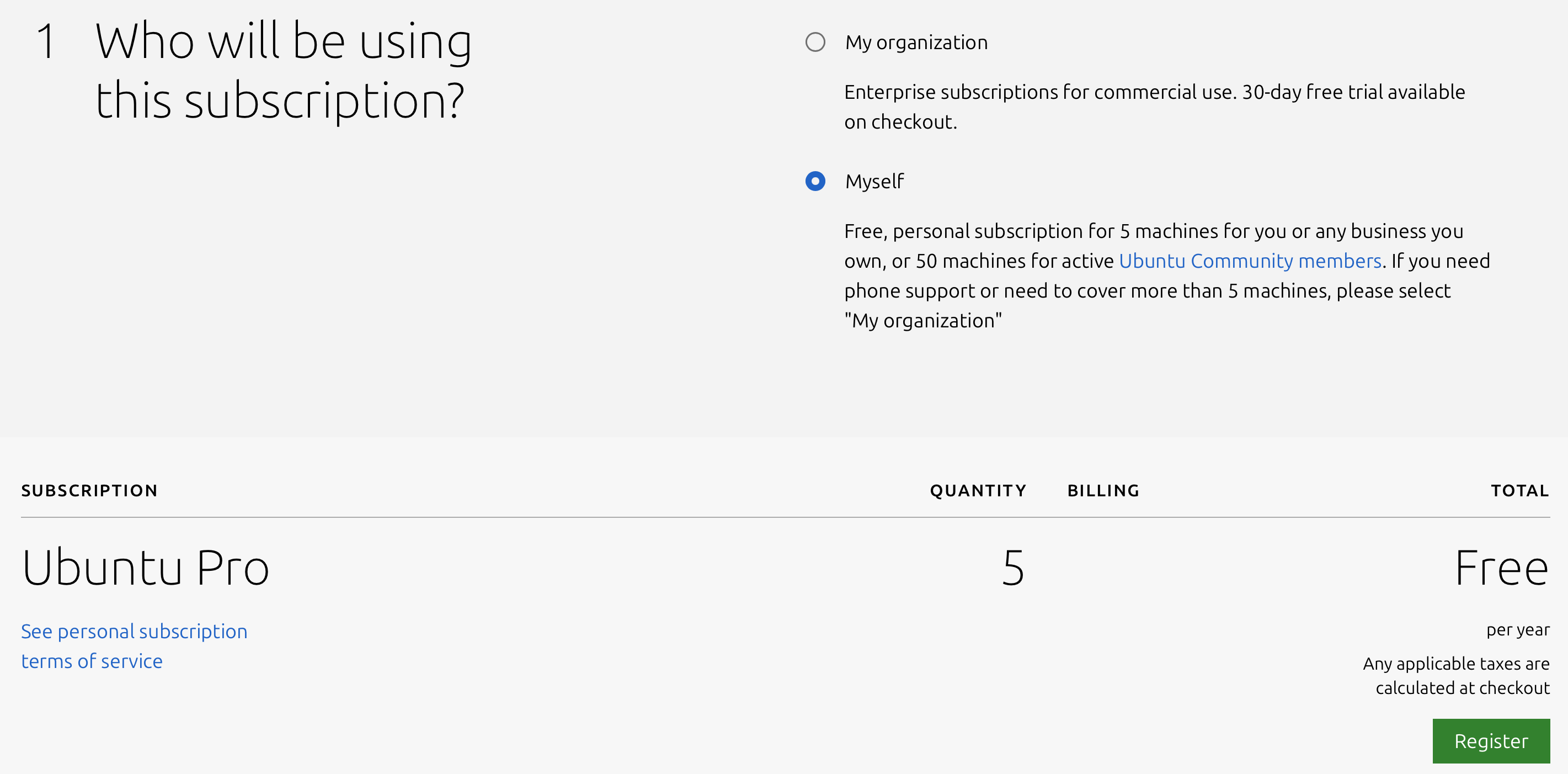
<p>Ubuntu One 계정으로 로그인한 뒤 구독 대상을 <code class="language-plaintext highlighter-rouge">Myself</code>로 선택하고 <code class="language-plaintext highlighter-rouge">Register</code>를 클릭한다. 계정이 없다면 먼저 계정 생성이 필요하다.</p>

<p><img src="/assets/images/ubuntu-pro-3.png" alt="" /></p>

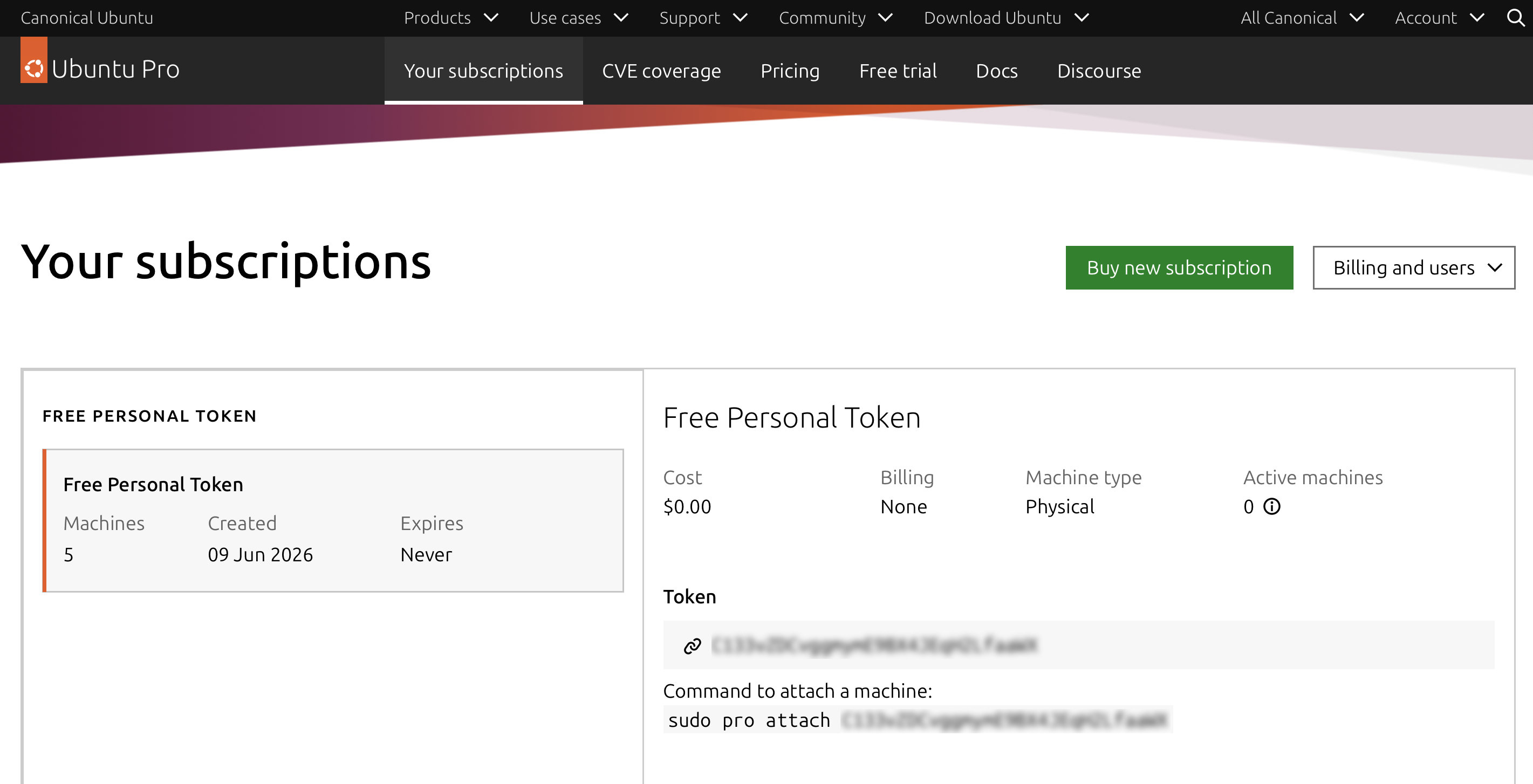
<p>등록이 끝나면 토큰과 함께 <code class="language-plaintext highlighter-rouge">Command to attach a machine</code> 명령어가 나온다. 이 명령어를 복사해서 우분투 서버에서 실행하면 된다.</p>

<p>실행 결과는 다음과 비슷하다.</p>

<div class="language-bash highlighter-rouge"><div class="highlight"><pre class="highlight"><code>ubuntu@instance-1:~<span class="nv">$ </span><span class="nb">sudo </span>pro attach C###@@@!!!###<span class="nv">$$$%</span>%%&amp;&amp;&amp;<span class="o">((()))</span><span class="c">##</span>
Enabling Ubuntu Pro: ESM Apps
Ubuntu Pro: ESM Apps enabled
Enabling Ubuntu Pro: ESM Infra
Ubuntu Pro: ESM Infra enabled
This machine is now attached to <span class="s1">'Ubuntu Pro - free personal subscription'</span>

SERVICE          ENTITLED  STATUS       DESCRIPTION
anbox-cloud      <span class="nb">yes       </span>disabled     Scalable Android <span class="k">in </span>the cloud
esm-apps         <span class="nb">yes       </span>enabled      Expanded Security Maintenance <span class="k">for </span>Applications
esm-infra        <span class="nb">yes       </span>enabled      Expanded Security Maintenance <span class="k">for </span>Infrastructure
fips-updates     <span class="nb">yes       </span>disabled     FIPS compliant crypto packages with stable security updates
landscape        <span class="nb">yes       </span>disabled     Management and administration tool <span class="k">for </span>Ubuntu
realtime-kernel<span class="k">*</span> <span class="nb">yes       </span>disabled     Ubuntu kernel with PREEMPT_RT patches integrated
usg              <span class="nb">yes       </span>disabled     Security compliance and audit tools

 <span class="k">*</span> Service has variants

NOTICES
Operation <span class="k">in </span>progress: pro attach

For a list of all Ubuntu Pro services and variants, run <span class="s1">'pro status --all'</span>
Enable services with: pro <span class="nb">enable</span> &lt;service&gt;

     Account: <span class="nb">test</span>@gmail.com
Subscription: Ubuntu Pro - free personal subscription
ubuntu@instance-1:~<span class="err">$</span>
</code></pre></div></div>

<p>여기까지 나오면 등록은 끝난다. 이후 <code class="language-plaintext highlighter-rouge">sudo apt upgrade</code>를 다시 실행하면, 앞서 Ubuntu Pro 안내만 표시되던 패키지가 실제 업데이트 대상에 포함되는 것을 확인할 수 있다.</p>

<p>정리하면 <code class="language-plaintext highlighter-rouge">apt upgrade</code> 중 Ubuntu Pro 관련 문구가 보인다고 해서 시스템에 문제가 생긴 것은 아니다. 기본 LTS 보안 지원 범위를 넘어서는 추가 보안 업데이트가 있다는 뜻이다. 개인 서버나 개인 프로젝트용 우분투를 운영 중이라면 무료 구독만으로도 충분히 활용할 만하다.</p>]]></content><author><name>DONGBUM KIM</name></author><category term="Linux" /><category term="DevOps" /><category term="Ubuntu" /><category term="Ubuntu Pro" /><category term="ESM" /><category term="apt" /><category term="rclone" /><summary type="html"><![CDATA[apt upgrade 실행 중 Ubuntu Pro 안내 메시지가 나왔을 때 그 의미와 무료 개인 구독 등록 방법을 정리했다.]]></summary></entry><entry><title type="html">Git 저장소 다이어트: .git 용량 영혼까지 끌어모아 줄이는 대청소 명령어 조합</title><link href="https://dongbum.io/2026/05/28/git-repository-diet-cleanup-commands" rel="alternate" type="text/html" title="Git 저장소 다이어트: .git 용량 영혼까지 끌어모아 줄이는 대청소 명령어 조합" /><published>2026-05-28T23:50:00+09:00</published><updated>2026-05-28T23:50:00+09:00</updated><id>https://dongbum.io/2026/05/28/git-repository-diet-cleanup-commands</id><content type="html" xml:base="https://dongbum.io/2026/05/28/git-repository-diet-cleanup-commands"><![CDATA[<p>개발자라면 누구나 한 번쯤 경험하는 상황이 있다. 소스 코드는 몇 MB에 불과한데, <code class="language-plaintext highlighter-rouge">.git</code> 폴더 용량은 수 GB까지 비대해져 있는 경우다. 특히 이미지나 바이너리 같은 대용량 파일(Git LFS)을 다루는 프로젝트라면 디스크 압박이 더 크게 느껴진다.</p>

<p>오늘은 Git 저장소에 쌓인 잔재와 미사용 대용량 캐시를 한 번에 정리해 저장소 용량을 최적화하는, 이른바 “Git 대청소 명령어 조합”을 소개한다.</p>

<h2 id="한-줄로-실행하는-git-대청소-명령어">한 줄로 실행하는 Git 대청소 명령어</h2>

<p>프로젝트의 Git 루트 폴더에서 아래 명령어를 실행하면 된다.</p>

<div class="language-bash highlighter-rouge"><div class="highlight"><pre class="highlight"><code>git reflog expire <span class="nt">--expire</span><span class="o">=</span>now <span class="nt">--all</span> <span class="o">&amp;&amp;</span> git fetch <span class="o">&amp;&amp;</span> git pull <span class="o">&amp;&amp;</span> git gc <span class="nt">--prune</span><span class="o">=</span>now <span class="o">&amp;&amp;</span> git lfs prune
</code></pre></div></div>

<p>각 명령어가 실제로 어떤 역할을 하는지 순서대로 살펴보자.</p>

<h2 id="명령어-상세-분석">명령어 상세 분석</h2>

<h3 id="1-연결-고리-끊기-git-reflog-expire">1) 연결 고리 끊기: <code class="language-plaintext highlighter-rouge">git reflog expire</code></h3>

<div class="language-bash highlighter-rouge"><div class="highlight"><pre class="highlight"><code>git reflog expire <span class="nt">--expire</span><span class="o">=</span>now <span class="nt">--all</span>
</code></pre></div></div>

<p>Git은 <code class="language-plaintext highlighter-rouge">git reset</code>이나 브랜치 삭제 이후에도 reflog에 작업 이력을 일정 기간(기본 약 90일) 보관한다. 문제는 이 기록이 디스크 용량을 계속 차지한다는 점이다.</p>

<p><code class="language-plaintext highlighter-rouge">--expire=now --all</code>은 이 보관 이력을 즉시 만료 처리한다. 즉, 아직 객체는 남아 있어도 “더 이상 되살릴 근거가 없는 상태”로 만들어 이후 정리 단계에서 제거 가능하게 만든다.</p>

<h3 id="2-최신-상태-동기화-git-fetch--git-pull">2) 최신 상태 동기화: <code class="language-plaintext highlighter-rouge">git fetch</code> + <code class="language-plaintext highlighter-rouge">git pull</code></h3>

<div class="language-bash highlighter-rouge"><div class="highlight"><pre class="highlight"><code>git fetch <span class="o">&amp;&amp;</span> git pull
</code></pre></div></div>

<p>본격적인 정리 전에 원격 저장소 기준 최신 상태로 동기화하는 단계다. 정리 직전 기준점을 맞춰두면, 불필요한 불안 요소를 줄이고 작업 안정성을 높일 수 있다.</p>

<h3 id="3-물리적-삭제-및-압축-git-gc">3) 물리적 삭제 및 압축: <code class="language-plaintext highlighter-rouge">git gc</code></h3>

<div class="language-bash highlighter-rouge"><div class="highlight"><pre class="highlight"><code>git gc <span class="nt">--prune</span><span class="o">=</span>now
</code></pre></div></div>

<p>Git의 GC(Garbage Collection)를 강제 실행한다. 앞 단계에서 만료 처리된 객체 중 도달 불가능한 데이터들을 실제 디스크에서 삭제하고, 남은 객체들은 packfile로 재정렬/압축한다.</p>

<p>결과적으로 <code class="language-plaintext highlighter-rouge">.git</code> 용량 감소뿐 아니라 저장소 성능(객체 조회, 전송 효율)에도 도움이 된다.</p>

<h3 id="4-대용량-파일-캐시-정리-git-lfs-prune">4) 대용량 파일 캐시 정리: <code class="language-plaintext highlighter-rouge">git lfs prune</code></h3>

<div class="language-bash highlighter-rouge"><div class="highlight"><pre class="highlight"><code>git lfs prune
</code></pre></div></div>

<p>Git LFS를 사용하는 저장소라면 사실상 필수 단계다. 과거 체크아웃에서 내려받은 대용량 LFS 객체 로컬 캐시가 누적되어 용량을 크게 잡아먹기 때문이다.</p>

<p><code class="language-plaintext highlighter-rouge">git lfs prune</code>은 현재 기준으로 더 이상 필요 없는 오래된 LFS 로컬 객체를 정리한다. 원격 LFS 저장소 데이터가 지워지는 것은 아니므로, 일반적인 사용에서는 안전하다.</p>

<h2 id="실행-전-주의사항-필독">실행 전 주의사항 (필독)</h2>

<p>아래 항목은 반드시 확인하고 실행하자.</p>

<ol>
  <li>
    <p>복구 불가능성
<code class="language-plaintext highlighter-rouge">reflog</code>를 만료하고 <code class="language-plaintext highlighter-rouge">gc --prune=now</code>까지 실행하면, 실수로 지운 커밋/브랜치를 되살릴 여지가 크게 줄어든다. 사실상 로컬 타임머신을 비우는 작업이다.</p>
  </li>
  <li>
    <p>미푸시 작업 백업
원격에 올리지 않은 커밋이 있다면 먼저 <code class="language-plaintext highlighter-rouge">git push</code>로 보호하자. 중요한 변경은 별도 백업 브랜치/태그를 만들어 두는 것을 권장한다.</p>
  </li>
  <li>
    <p>깨끗한 작업 상태 권장
정리 작업은 충돌 요인이 적은 상태에서 하는 것이 좋다. 가능하면 작업 중인 변경이 없는 클린 상태에서 실행하자.</p>
  </li>
</ol>

<h2 id="마무리">마무리</h2>

<p>이 명령어 조합을 주기적으로 사용하면 비대해진 <code class="language-plaintext highlighter-rouge">.git</code> 폴더가 눈에 띄게 줄어드는 경우가 많다. 특히 CI/CD 빌드 서버 디스크가 빠듯하거나, 대용량 에셋 교체가 잦은 프로젝트를 운영한다면 꽤 체감이 크다.</p>

<p>필요할 때마다 아래 한 줄만 기억해도 된다.</p>

<div class="language-bash highlighter-rouge"><div class="highlight"><pre class="highlight"><code>git reflog expire <span class="nt">--expire</span><span class="o">=</span>now <span class="nt">--all</span> <span class="o">&amp;&amp;</span> git fetch <span class="o">&amp;&amp;</span> git pull <span class="o">&amp;&amp;</span> git gc <span class="nt">--prune</span><span class="o">=</span>now <span class="o">&amp;&amp;</span> git lfs prune
</code></pre></div></div>]]></content><author><name>DONGBUM KIM</name></author><category term="Git" /><category term="DevOps" /><category term="git" /><category term="git-gc" /><category term="reflog" /><category term="lfs" /><category term="optimization" /><category term="maintenance" /><summary type="html"><![CDATA[비대해진 .git 폴더를 정리하기 위한 reflog 만료, gc, LFS prune 조합과 주의사항을 한 번에 정리한다.]]></summary></entry><entry><title type="html">C++ static 람다가 예상과 다르게 동작하는 이유</title><link href="https://dongbum.io/2026/03/30/static-lambda" rel="alternate" type="text/html" title="C++ static 람다가 예상과 다르게 동작하는 이유" /><published>2026-03-30T20:22:00+09:00</published><updated>2026-03-30T20:22:00+09:00</updated><id>https://dongbum.io/2026/03/30/static-lambda</id><content type="html" xml:base="https://dongbum.io/2026/03/30/static-lambda"><![CDATA[<p>최근 C++ 코드를 정리하다가 발견하기 꽤 어려운 버그를 하나 만났다. 컴파일도 잘 되고, 런타임 에러도 없는데 결과만 이상하게 나오는 경우였다.</p>

<p>문제의 코드는 대략 이런 형태였다.</p>

<div class="language-cpp highlighter-rouge"><div class="highlight"><pre class="highlight"><code><span class="n">RzVoid</span> <span class="n">RzBuffManager</span><span class="o">::</span><span class="n">DetachPropBuff</span><span class="p">(</span> <span class="k">const</span> <span class="n">RzBool</span> <span class="n">bOnlyPropBuff</span><span class="p">,</span> <span class="n">RzKeySet</span><span class="o">&amp;</span> <span class="n">outCooltimeKeySet</span><span class="p">,</span> <span class="n">RzKeySet</span><span class="o">&amp;</span> <span class="n">outBuffKeySet</span> <span class="p">)</span>
<span class="p">{</span>
    <span class="k">static</span> <span class="k">const</span> <span class="n">RzBuffDeleteHandler</span> <span class="n">handler</span> <span class="o">=</span> <span class="p">[</span><span class="n">bOnlyPropBuff</span><span class="p">](</span> <span class="k">const</span> <span class="n">RzBuffDeleteParamInfo</span><span class="o">&amp;</span> <span class="n">paramInfo</span><span class="p">,</span> <span class="k">const</span> <span class="n">RzBuffPtr</span><span class="o">&amp;</span> <span class="n">spBuff</span> <span class="p">)</span>
    <span class="p">{</span>
        <span class="k">if</span> <span class="p">(</span> <span class="n">bOnlyPropBuff</span> <span class="p">)</span>
        <span class="p">{</span>
            <span class="c1">// blah blah...</span>
        <span class="p">}</span>
        <span class="k">return</span> <span class="nb">true</span><span class="p">;</span>
    <span class="p">};</span>

    <span class="n">doAnything</span><span class="p">();</span>
<span class="p">}</span>
</code></pre></div></div>

<p>겉으로 보기에는 큰 문제가 없어 보인다. Visual Studio 2019에서도 컴파일이 잘 되고, 실행 중에도 별다른 오류가 발생하지 않는다. 하지만 실제 동작은 기대와 달랐다.</p>

<p>핵심은 <code class="language-plaintext highlighter-rouge">handler</code>가 <code class="language-plaintext highlighter-rouge">static</code>이라는 점이다. 이 람다는 지역 정적 변수로 한 번만 초기화되며, 그 시점에 캡처한 <code class="language-plaintext highlighter-rouge">bOnlyPropBuff</code> 값도 함께 고정된다.</p>

<p>즉, 처음 함수가 호출될 때 <code class="language-plaintext highlighter-rouge">bOnlyPropBuff</code>가 <code class="language-plaintext highlighter-rouge">true</code>였다면 이후 호출에서 <code class="language-plaintext highlighter-rouge">false</code>를 넘겨도 람다 내부에서는 계속 처음 값만 사용하게 된다. 반대로 첫 호출이 <code class="language-plaintext highlighter-rouge">false</code>였다면 그 뒤로도 계속 <code class="language-plaintext highlighter-rouge">false</code>처럼 동작한다.</p>

<p>나는 매 호출마다 람다가 현재의 <code class="language-plaintext highlighter-rouge">bOnlyPropBuff</code> 값을 받아서 동작하길 기대했다. 하지만 <code class="language-plaintext highlighter-rouge">static</code>으로 선언된 순간, 이 람다는 “매번 새로 만들어지는 함수 객체”가 아니라 “처음 한 번 만들어진 뒤 계속 재사용되는 객체”가 되어버린다.</p>

<p>이런 종류의 버그가 까다로운 이유는 다음과 같다.</p>

<ul>
  <li>컴파일 에러가 없다.</li>
  <li>런타임 크래시도 없다.</li>
  <li>코드만 얼핏 보면 캡처한 값이 매번 바뀔 것처럼 보인다.</li>
</ul>

<p>결국 해결 방법은 단순하다. 호출마다 다른 값을 반영해야 하는 람다라면 <code class="language-plaintext highlighter-rouge">static</code>을 제거해야 한다. 반대로 <code class="language-plaintext highlighter-rouge">static</code>을 유지하고 싶다면, 호출마다 변하는 값을 캡처에 의존하지 않도록 구조를 바꿔야 한다.</p>

<p>작은 차이처럼 보여도, <code class="language-plaintext highlighter-rouge">static</code> 지역 변수와 람다 캡처가 만나면 꽤 교묘한 버그가 만들어질 수 있다. 비슷한 패턴을 사용하고 있다면 한 번쯤 다시 점검해 보는 것이 좋겠다.</p>]]></content><author><name>DONGBUM KIM</name></author><category term="C++" /><category term="Programming" /><category term="cplusplus" /><category term="lambda" /><category term="static" /><category term="bug" /><summary type="html"><![CDATA[static 지역 변수로 선언된 람다가 값을 캡처할 때, 첫 초기화 시점의 값이 고정되어 기대와 다른 동작을 만드는 원인을 정리했다.]]></summary></entry><entry><title type="html">MSSQL 프로시저 실행 중 데드락 — 원인과 해결까지</title><link href="https://dongbum.io/2025/07/03/execute-mssql-procedure-on-jenkins" rel="alternate" type="text/html" title="MSSQL 프로시저 실행 중 데드락 — 원인과 해결까지" /><published>2025-07-03T08:21:00+09:00</published><updated>2025-07-03T08:21:00+09:00</updated><id>https://dongbum.io/2025/07/03/execute-mssql-procedure-on-jenkins</id><content type="html" xml:base="https://dongbum.io/2025/07/03/execute-mssql-procedure-on-jenkins"><![CDATA[<h4 id="데드락-무슨-일이-있었나">데드락! 무슨 일이 있었나</h4>

<p>게임 패치를 위해 퍼블리셔에게 DB 패치 스크립트를 한데 묶어 전달했다.
서버 업데이트 당일, 모든 스크립트는 정상적으로 처리됐지만… 단 하나의 스크립트에서 모든 샤드에서 에러가 발생했다.</p>

<p>퍼블리셔 Tech PM이 전달해준 <strong>5천 줄짜리 로그</strong>를 샅샅이 뒤져보던 중, 눈에 띄는 메시지를 발견했다.</p>

<div class="language-plaintext highlighter-rouge"><div class="highlight"><pre class="highlight"><code># [tid:19][ERROR] (1205, b'Transaction (Process ID 155) was deadlocked on lock | communication buffer resources with another process and has been chosen as the deadlock victim. Rerun the transaction.DB-Lib error message 20018, severity 13:\nGeneral SQL Server error: Check messages from the SQL Server\n') 201703
Exception in thread Thread-13:
Traceback (most recent call last):
  File "src/pymssql.pyx", line 448, in pymssql.Cursor.execute
  File "src/_mssql.pyx", line 1064, in _mssql.MSSQLConnection.execute_query
  File "src/_mssql.pyx", line 1096, in _mssql.MSSQLConnection.execute_query
  File "src/_mssql.pyx", line 1294, in _mssql.MSSQLConnection.get_result
  File "src/_mssql.pyx", line 1639, in _mssql.check_cancel_and_raise
  File "src/_mssql.pyx", line 1683, in _mssql.maybe_raise_MSSQLDatabaseException
_mssql.MSSQLDatabaseException: (1205, b'Transaction (Process ID 148) was deadlocked on lock | communication buffer resources with another process and has been chosen as the deadlock victim. Rerun the transaction.DB-Lib error message 20018, severity 13:\nGeneral SQL Server error: Check messages from the SQL Server\n')

During handling of the above exception, another exception occurred:

Traceback (most recent call last):
  File "/home/infra/py/woodstock/execute_batch_sql/execute_batch_all_sql_use_thread_mssql.py", line 209, in process_restore
    p_db.cursor.execute(query)
  File "src/pymssql.pyx", line 468, in pymssql.Cursor.execute
pymssql.OperationalError: (1205, b'Transaction (Process ID 148) was deadlocked on lock | communication buffer resources with another process and has been chosen as the deadlock victim. Rerun the transaction.DB-Lib error message 20018, severity 13:\nGeneral SQL Server error: Check messages from the SQL Server\n')
</code></pre></div></div>

<p>클래식한 <strong>데드락 에러</strong>였다. 조금 더 자세히 보면 다음과 같은 <code class="language-plaintext highlighter-rouge">pymssql</code> 예외 트레이스백도 확인할 수 있었다.</p>

<h4 id="테스트할-땐-멀쩡했는데">테스트할 땐 멀쩡했는데?</h4>

<p>문제의 스크립트는 내부 QA 테스트에서는 아무런 문제가 없었다. 직접 SSMS에서 한 번에 실행했을 때는 에러도 없고, 처리 시간도 양호했다.</p>

<p>하지만 퍼블리셔 환경은 달랐다.<br />
그들은 <strong>젠킨스에서 파이썬 스크립트 (<code class="language-plaintext highlighter-rouge">pymssql</code>)로</strong>, <strong>멀티스레드</strong>로 동시에 각 샤드에 SQL을 실행하고 있었던 것 같다. (정확히는 확인할 수 없지만 정황상 꽤 유력하다.)</p>

<p>알고 보니 내가 작성한 쿼리는 다음과 같은 <strong>데드락 발생 조건</strong>을 잔뜩 갖추고 있었다:</p>

<ul>
  <li><code class="language-plaintext highlighter-rouge">UPDATE ... JOIN</code> 구문</li>
  <li>여러 테이블을 동시에 수정</li>
  <li>UDF (사용자 정의 함수) 호출</li>
</ul>

<p>단일 세션에서는 잘 돌아가지만, 멀티세션/멀티스레드 상황에서는 충돌이 일어날 수밖에 없었다.</p>

<h4 id="해결책은-의외로-간단했다">해결책은 의외로 간단했다</h4>

<p>쿼리를 리팩터링해서 테이블 접근 순서를 맞추거나, 복잡한 힌트를 주는 방법도 고려했지만…</p>

<p>가장 간단하고 확실한 해결책은 <strong>단독 실행</strong>이었다.</p>

<p>퍼블리셔 측에 “이 쿼리만은 병렬 실행하지 말고 단독으로 실행해 달라”고 요청했다. 그리고 실제로 그렇게 하자 문제는 바로 해결되었다.</p>

<h4 id="마무리">마무리</h4>

<p>데드락은 언제나 예상치 못한 상황에서 등장한다. 특히 <strong>멀티스레드 + 복잡한 쿼리</strong> 조합은 사고가 나기 쉬운 구조다.</p>

<p>테스트할 땐 멀쩡했는데 실서버에서만 문제가 생긴다면, “이 쿼리가 병렬 실행될 가능성은 없었을까?” 한 번쯤 되짚어보는 것도 좋은 습관이다.</p>]]></content><author><name>DONGBUM KIM</name></author><category term="Database/SQL" /><category term="DevStory" /><category term="database" /><category term="sql" /><category term="mssql" /><category term="jenkins" /><category term="deadlock" /><category term="pymssql" /><category term="gameserver" /><summary type="html"><![CDATA[게임 패치 배포 중 멀티스레드 환경에서 MSSQL 데드락이 발생한 원인을 분석하고, 단독 실행으로 해결한 과정을 정리했다.]]></summary></entry><entry><title type="html">C++에서 병렬 정렬 알고리즘의 성능 비교</title><link href="https://dongbum.io/2025/04/22/std-execution-par" rel="alternate" type="text/html" title="C++에서 병렬 정렬 알고리즘의 성능 비교" /><published>2025-04-22T15:04:36+09:00</published><updated>2025-04-22T15:04:36+09:00</updated><id>https://dongbum.io/2025/04/22/std-execution-par</id><content type="html" xml:base="https://dongbum.io/2025/04/22/std-execution-par"><![CDATA[<p>서버 코드를 점검하다가 작은 알고리즘부터 하나씩 개선하고 있다.</p>

<p>병렬 프로그래밍을 조사하던 중 정렬 알고리즘에서도 최적화 여지가 있다는 것을 알게 되어 테스트해보았다.</p>

<p>기존 코드는 <code class="language-plaintext highlighter-rouge">std::sort</code>를 사용하고 있었다. 이를 <code class="language-plaintext highlighter-rouge">concurrency::parallel_sort</code>로 바꿀 수 있었지만, PPL은 비표준인 데다 Windows에서만 동작하는 코드였다. ChatGPT는 <code class="language-plaintext highlighter-rouge">concurrency::parallel_sort</code> 대신 <code class="language-plaintext highlighter-rouge">std::sort</code>에 <code class="language-plaintext highlighter-rouge">std::execution::par</code>를 조합하는 방식을 추천해주었다. (C++17 이상에서만 유효하다.)</p>

<h3 id="테스트-코드">테스트 코드</h3>

<p>기존의 <code class="language-plaintext highlighter-rouge">std::sort</code>와 <code class="language-plaintext highlighter-rouge">std::sort + std::execution::par</code>를 비교하는 코드를 작성했다.</p>

<div class="language-c++ highlighter-rouge"><div class="highlight"><pre class="highlight"><code><span class="cp">#define WIN32_LEAN_AND_MEAN
#include</span> <span class="cpf">&lt;Windows.h&gt;</span><span class="cp">
#include</span> <span class="cpf">&lt;vector&gt;</span><span class="cp">
#include</span> <span class="cpf">&lt;string&gt;</span><span class="cp">
#include</span> <span class="cpf">&lt;random&gt;</span><span class="cp">
#include</span> <span class="cpf">&lt;chrono&gt;</span><span class="cp">
#include</span> <span class="cpf">&lt;execution&gt;</span><span class="cp">
#include</span> <span class="cpf">&lt;iostream&gt;</span><span class="cp">
#include</span> <span class="cpf">&lt;locale&gt;</span><span class="cp">
</span>
<span class="kt">int</span> <span class="nf">main</span><span class="p">(</span> <span class="kt">void</span> <span class="p">)</span>
<span class="p">{</span>
	<span class="n">std</span><span class="o">::</span><span class="n">vector</span><span class="o">&lt;</span><span class="kt">int</span><span class="o">&gt;</span> <span class="n">vec</span><span class="p">;</span>

	<span class="k">for</span> <span class="p">(</span> <span class="k">auto</span> <span class="n">i</span> <span class="o">=</span> <span class="mi">0</span><span class="p">;</span> <span class="n">i</span> <span class="o">&lt;</span> <span class="mi">1000000</span><span class="p">;</span> <span class="o">++</span><span class="n">i</span> <span class="p">)</span>
		<span class="n">vec</span><span class="p">.</span><span class="n">push_back</span><span class="p">(</span> <span class="n">i</span> <span class="p">);</span>

	<span class="n">std</span><span class="o">::</span><span class="n">random_device</span> <span class="n">rd</span><span class="p">;</span>
	<span class="n">std</span><span class="o">::</span><span class="n">mt19937</span> <span class="n">engine</span><span class="p">(</span> <span class="n">rd</span><span class="p">()</span> <span class="p">);</span>
	<span class="n">std</span><span class="o">::</span><span class="n">shuffle</span><span class="p">(</span> <span class="n">vec</span><span class="p">.</span><span class="n">begin</span><span class="p">(),</span> <span class="n">vec</span><span class="p">.</span><span class="n">end</span><span class="p">(),</span> <span class="n">engine</span> <span class="p">);</span>

	<span class="n">std</span><span class="o">::</span><span class="n">vector</span><span class="o">&lt;</span><span class="kt">int</span><span class="o">&gt;</span> <span class="n">vec1</span> <span class="o">=</span> <span class="n">vec</span><span class="p">;</span>
	<span class="n">std</span><span class="o">::</span><span class="n">vector</span><span class="o">&lt;</span><span class="kt">int</span><span class="o">&gt;</span> <span class="n">vec2</span> <span class="o">=</span> <span class="n">vec</span><span class="p">;</span>

	<span class="p">{</span>
		<span class="c1">// 시간 측정 시작</span>
		<span class="k">auto</span> <span class="n">start</span> <span class="o">=</span> <span class="n">std</span><span class="o">::</span><span class="n">chrono</span><span class="o">::</span><span class="n">high_resolution_clock</span><span class="o">::</span><span class="n">now</span><span class="p">();</span>

		<span class="n">std</span><span class="o">::</span><span class="n">sort</span><span class="p">(</span> <span class="n">vec1</span><span class="p">.</span><span class="n">begin</span><span class="p">(),</span> <span class="n">vec1</span><span class="p">.</span><span class="n">end</span><span class="p">(),</span> <span class="p">[](</span> <span class="k">auto</span> <span class="n">lhs</span><span class="p">,</span> <span class="k">auto</span> <span class="n">rhs</span> <span class="p">)</span>
		<span class="p">{</span>
			<span class="k">return</span> <span class="n">lhs</span> <span class="o">&lt;</span> <span class="n">rhs</span><span class="p">;</span>
		<span class="p">}</span> <span class="p">);</span>

		<span class="c1">// 시간 측정 끝</span>
		<span class="k">auto</span> <span class="n">end</span> <span class="o">=</span> <span class="n">std</span><span class="o">::</span><span class="n">chrono</span><span class="o">::</span><span class="n">high_resolution_clock</span><span class="o">::</span><span class="n">now</span><span class="p">();</span>

		<span class="c1">// 경과 시간 계산 (단위: 마이크로초)</span>
		<span class="k">auto</span> <span class="n">duration</span> <span class="o">=</span> <span class="n">std</span><span class="o">::</span><span class="n">chrono</span><span class="o">::</span><span class="n">duration_cast</span><span class="o">&lt;</span><span class="n">std</span><span class="o">::</span><span class="n">chrono</span><span class="o">::</span><span class="n">microseconds</span><span class="o">&gt;</span><span class="p">(</span> <span class="n">end</span> <span class="o">-</span> <span class="n">start</span> <span class="p">);</span>

		<span class="n">std</span><span class="o">::</span><span class="n">cout</span> <span class="o">&lt;&lt;</span> <span class="s">"실행 시간: "</span> <span class="o">&lt;&lt;</span> <span class="n">duration</span><span class="p">.</span><span class="n">count</span><span class="p">()</span> <span class="o">&lt;&lt;</span> <span class="s">" 마이크로초"</span> <span class="o">&lt;&lt;</span> <span class="n">std</span><span class="o">::</span><span class="n">endl</span><span class="p">;</span>
	<span class="p">}</span>

	<span class="p">{</span>
		<span class="c1">// 시간 측정 시작</span>
		<span class="k">auto</span> <span class="n">start</span> <span class="o">=</span> <span class="n">std</span><span class="o">::</span><span class="n">chrono</span><span class="o">::</span><span class="n">high_resolution_clock</span><span class="o">::</span><span class="n">now</span><span class="p">();</span>

		<span class="n">std</span><span class="o">::</span><span class="n">sort</span><span class="p">(</span> <span class="n">std</span><span class="o">::</span><span class="n">execution</span><span class="o">::</span><span class="n">par</span><span class="p">,</span> <span class="n">vec1</span><span class="p">.</span><span class="n">begin</span><span class="p">(),</span> <span class="n">vec1</span><span class="p">.</span><span class="n">end</span><span class="p">(),</span> <span class="p">[](</span> <span class="k">auto</span> <span class="n">lhs</span><span class="p">,</span> <span class="k">auto</span> <span class="n">rhs</span> <span class="p">)</span>
		<span class="p">{</span>
			<span class="k">return</span> <span class="n">lhs</span> <span class="o">&lt;</span> <span class="n">rhs</span><span class="p">;</span>
		<span class="p">}</span> <span class="p">);</span>

		<span class="c1">// 시간 측정 끝</span>
		<span class="k">auto</span> <span class="n">end</span> <span class="o">=</span> <span class="n">std</span><span class="o">::</span><span class="n">chrono</span><span class="o">::</span><span class="n">high_resolution_clock</span><span class="o">::</span><span class="n">now</span><span class="p">();</span>

		<span class="c1">// 경과 시간 계산 (단위: 마이크로초)</span>
		<span class="k">auto</span> <span class="n">duration</span> <span class="o">=</span> <span class="n">std</span><span class="o">::</span><span class="n">chrono</span><span class="o">::</span><span class="n">duration_cast</span><span class="o">&lt;</span><span class="n">std</span><span class="o">::</span><span class="n">chrono</span><span class="o">::</span><span class="n">microseconds</span><span class="o">&gt;</span><span class="p">(</span> <span class="n">end</span> <span class="o">-</span> <span class="n">start</span> <span class="p">);</span>

		<span class="n">std</span><span class="o">::</span><span class="n">cout</span> <span class="o">&lt;&lt;</span> <span class="s">"실행 시간: "</span> <span class="o">&lt;&lt;</span> <span class="n">duration</span><span class="p">.</span><span class="n">count</span><span class="p">()</span> <span class="o">&lt;&lt;</span> <span class="s">" 마이크로초"</span> <span class="o">&lt;&lt;</span> <span class="n">std</span><span class="o">::</span><span class="n">endl</span><span class="p">;</span>
	<span class="p">}</span>

	<span class="k">return</span> <span class="mi">0</span><span class="p">;</span>
<span class="p">}</span>
</code></pre></div></div>

<p>배열에 int 값을 여러 개 넣고 섞은 후 다시 정렬하는 데 걸리는 시간을 측정하는 코드이다.</p>

<h3 id="테스트-결과">테스트 결과</h3>

<p>단위는 마이크로초(μs)이다.</p>

<table>
  <thead>
    <tr>
      <th>원소 개수</th>
      <th>std::sort</th>
      <th>std::sort + std::execution::par</th>
    </tr>
  </thead>
  <tbody>
    <tr>
      <td>100</td>
      <td>20</td>
      <td>61</td>
    </tr>
    <tr>
      <td>300</td>
      <td>70</td>
      <td>98</td>
    </tr>
    <tr>
      <td>500</td>
      <td>111</td>
      <td>86</td>
    </tr>
    <tr>
      <td>1,000</td>
      <td>258</td>
      <td>128</td>
    </tr>
    <tr>
      <td>10,000</td>
      <td>3,302</td>
      <td>461</td>
    </tr>
    <tr>
      <td>100,000</td>
      <td>41,760</td>
      <td>4,022</td>
    </tr>
    <tr>
      <td>1,000,000</td>
      <td>509,795</td>
      <td>48,412</td>
    </tr>
    <tr>
      <td>10,000,000</td>
      <td>5,024,498</td>
      <td>564,703</td>
    </tr>
    <tr>
      <td>100,000,000</td>
      <td>68,011,136</td>
      <td>5,948,772</td>
    </tr>
  </tbody>
</table>

<p>테스트 환경은 Intel Core i5-12400F 2.5GHz, 64GB 메모리, Visual Studio 2019 x64이다.</p>

<p>표를 보면 원소 개수가 300개 이하일 때는 기본 <code class="language-plaintext highlighter-rouge">std::sort</code>가 더 빠르다. 500개 정도부터 <code class="language-plaintext highlighter-rouge">std::execution::par</code>의 효과가 나타나기 시작하고, 1,000개에서는 약 절반, 10,000개 이상에서는 약 1/10 수준으로 시간이 줄어든다.</p>

<h3 id="결론">결론</h3>

<p>원소 개수 300개 미만은 <code class="language-plaintext highlighter-rouge">std::sort</code>, 300개 이상은 <code class="language-plaintext highlighter-rouge">std::sort + std::execution::par</code>를 사용하는 것이 좋다.</p>

<p>아래와 같은 템플릿 함수를 만들어 사용 중이다. <code class="language-plaintext highlighter-rouge">std::sort</code>와 동일한 인터페이스를 유지하면서 원소 개수에 따라 정렬 전략을 자동으로 선택한다.</p>

<div class="language-c++ highlighter-rouge"><div class="highlight"><pre class="highlight"><code><span class="k">template</span><span class="o">&lt;</span><span class="k">class</span> <span class="nc">RandomIt</span><span class="p">,</span> <span class="k">class</span> <span class="nc">Compare</span><span class="p">&gt;</span>
<span class="kt">void</span> <span class="nf">RzSort</span><span class="p">(</span> <span class="n">RandomIt</span> <span class="n">first</span><span class="p">,</span> <span class="n">RandomIt</span> <span class="n">last</span><span class="p">,</span> <span class="n">Compare</span> <span class="n">comp</span> <span class="p">)</span>
<span class="p">{</span>
	<span class="k">auto</span> <span class="n">size</span> <span class="o">=</span> <span class="n">std</span><span class="o">::</span><span class="n">distance</span><span class="p">(</span> <span class="n">first</span><span class="p">,</span> <span class="n">last</span> <span class="p">);</span>
	<span class="k">if</span> <span class="p">(</span> <span class="n">size</span> <span class="o">&lt;=</span> <span class="mi">0</span> <span class="p">)</span>
		<span class="k">return</span><span class="p">;</span>

	<span class="k">if</span> <span class="p">(</span> <span class="n">size</span> <span class="o">&lt;</span> <span class="mi">1000</span> <span class="p">)</span>
		<span class="n">std</span><span class="o">::</span><span class="n">sort</span><span class="p">(</span> <span class="n">first</span><span class="p">,</span> <span class="n">last</span><span class="p">,</span> <span class="n">comp</span> <span class="p">);</span>
	<span class="k">else</span>
		<span class="n">std</span><span class="o">::</span><span class="n">sort</span><span class="p">(</span> <span class="n">std</span><span class="o">::</span><span class="n">execution</span><span class="o">::</span><span class="n">par</span><span class="p">,</span> <span class="n">first</span><span class="p">,</span> <span class="n">last</span><span class="p">,</span> <span class="n">comp</span> <span class="p">);</span>
<span class="p">}</span>
</code></pre></div></div>]]></content><author><name>DONGBUM KIM</name></author><category term="C++" /><category term="cplusplus" /><category term="sort" /><category term="parallel" /><category term="execution" /><category term="algorithm" /><category term="performance" /><summary type="html"><![CDATA[std::sort와 std::execution::par를 조합한 병렬 정렬의 성능을 원소 개수별로 측정하고, 최적 임계값을 정리했다.]]></summary></entry><entry><title type="html">퍼포스 서버에서 여러 파일 한 번에 정리하기</title><link href="https://dongbum.io/2025/04/03/perforce-server-obiliterate-multi-files" rel="alternate" type="text/html" title="퍼포스 서버에서 여러 파일 한 번에 정리하기" /><published>2025-04-03T13:02:36+09:00</published><updated>2025-04-03T13:02:36+09:00</updated><id>https://dongbum.io/2025/04/03/perforce-server-obiliterate-multi-files</id><content type="html" xml:base="https://dongbum.io/2025/04/03/perforce-server-obiliterate-multi-files"><![CDATA[<p>퍼포스 서버를 관리하다 보면 대량의 바이너리 파일로 인해 서버 디스크가 점점 가득 찬다. 제때 관리해주지 않으면 퍼포스 서버가 불안정해질 수 있으므로 주기적으로 상태를 확인하며 관리해야 한다. 특히 오래된 리비전의 파일을 삭제하면 디스크 공간을 크게 확보할 수 있다.</p>

<p>퍼포스에는 이 기능을 담당하는 Obliterate Files 기능이 있는데, 문제는 수동으로만 동작한다는 점이다. 특정 리비전 범위를 지정해서 삭제할 수 있지만, 파일마다 일일이 처리해야 한다.</p>

<p>처음에는 파일을 하나씩 직접 처리했지만, 관리해야 할 파일이 많아지면서 자동으로 처리하는 배치 파일을 만들었다.</p>

<p><code class="language-plaintext highlighter-rouge">files_program.txt</code>에 정리할 파일 목록을 넣어두면 가장 최근 5개 리비전만 남기고 나머지를 삭제한다.</p>

<p>Obliterate 명령은 한 번 실행하면 절대 되돌릴 수 없다. 배치 파일을 실행하기 전에 코드를 충분히 파악하고, 반드시 테스트 파일로 먼저 검증한 뒤에 실행하길 바란다.</p>

<div class="language-plaintext highlighter-rouge"><div class="highlight"><pre class="highlight"><code>@echo off
setlocal enabledelayedexpansion

rem 파일 목록이 저장된 파일 경로 설정
set FILE_LIST=files_program.txt

rem files.txt 파일을 한 줄씩 읽어서 처리한다.
for /f "delims=" %%a in (%FILE_LIST%) do (
	set "TARGET_FILE=%%a"
	
	rem echo !TARGET_FILE!
	
    rem 가장 마지막 리비전 번호를 구한다.
    for /f "tokens=3" %%b in ('p4 fstat -T headRev !TARGET_FILE! 2^&gt;nul ^| find "headRev"') do set LATEST_REVISION=%%b

    rem echo !LATEST_REVISION!
	
	rem 마지막 5개 리비전이 5 초과일 때만 처리한다.
	if !LATEST_REVISION! gtr 5 (
        
	    set /a LATEST_REVISION -= 5
	    
	    rem echo !LATEST_REVISION!
	    
		rem obliterate 명령 실행
	    rem echo "p4 obliterate -T !TARGET_FILE!#1,#!LATEST_REVISION!"
	    
	    p4 obliterate -y -T !TARGET_FILE!#1,#!LATEST_REVISION!
    )
)

endlocal
</code></pre></div></div>

<p><code class="language-plaintext highlighter-rouge">files_program.txt</code> 파일은 아래와 같이 작성한다.</p>

<div class="language-plaintext highlighter-rouge"><div class="highlight"><pre class="highlight"><code>//depot/Project/Server/TestServer1.pdb
//depot/Project/Server/TestServer2.pdb

//depot/Project/Server/TestServer3.pdb
//depot/Project/Server/TestServer4.pdb
</code></pre></div></div>]]></content><author><name>DONGBUM KIM</name></author><category term="Perforce" /><category term="perforce" /><category term="vcs" /><category term="p4" /><category term="obliterate" /><category term="batch" /><category term="disk" /><summary type="html"><![CDATA[Perforce 서버의 디스크 용량 확보를 위해 Obliterate 명령을 여러 파일에 일괄 적용하는 배치 파일을 만든 과정을 정리했다.]]></summary></entry><entry><title type="html">리눅스에서 SMART 오류 감지</title><link href="https://dongbum.io/2023/12/06/linux-smart-failed" rel="alternate" type="text/html" title="리눅스에서 SMART 오류 감지" /><published>2023-12-06T13:54:36+09:00</published><updated>2023-12-06T13:54:36+09:00</updated><id>https://dongbum.io/2023/12/06/linux-smart-failed</id><content type="html" xml:base="https://dongbum.io/2023/12/06/linux-smart-failed"><![CDATA[<p>8년간 사용하던 NAS의 하드디스크에서 결국 에러 메시지가 발생했다. 알고 보니 매일 SMART 검사 에러 메시지가 메일로 오고 있었는데 미처 확인을 못했다.</p>

<div class="language-plaintext highlighter-rouge"><div class="highlight"><pre class="highlight"><code>Return-path: &lt;root@debian&gt;
Envelope-to: root@debian
Delivery-date: Sat, 25 Mar 2023 15:47:09 +0900
Received: from root by debian with local (Exim 4.94.2)
        (envelope-from &lt;root@debian&gt;)
        id 1pfxgD-00FRcJ-EF
        for root@debian; Sat, 25 Mar 2023 15:47:09 +0900
Subject: SMART error (CurrentPendingSector) detected on host: debian
To: &lt;root@debian&gt;
X-Mailer: mail (GNU Mailutils 3.10)
Message-Id: &lt;E1pfxgD-00FRcJ-EF@debian&gt;
From: root@debian
Date: Sat, 25 Mar 2023 15:47:09 +0900
X-UID: 60
Status: O

This message was generated by the smartd daemon running on:

   host name:  debian
   DNS domain: [Empty]

The following warning/error was logged by the smartd daemon:

Device: /dev/sdc [SAT], 4 Currently unreadable (pending) sectors

Device info:
SAMSUNG HD250HJ, S/N:S0UTJDWQ117986, WWN:5-0000f0-0db117986, FW:FH100-06, 250 GB

For details see host's SYSLOG.

You can also use the smartctl utility for further investigation.
The original message about this issue was sent at Fri Jan 27 14:47:09 2023 KST
Another message will be sent in 24 hours if the problem persists.
</code></pre></div></div>

<p>이 디스크는 2008년에 생산된 삼성 250GB 하드디스크다. 2023년 말 기준으로 대략 15년간 동작한 셈이다. 내가 나눔받아 사용하기 시작한 것이 2015년 초였고, 그 이후 절반 이상의 기간은 거의 24시간 가동 상태였다. 이 정도면 불량 섹터가 생기는 것도 당연한 일이었다.</p>

<p>집에 돌아와 해당 디스크의 파일을 모두 지우고 NAS에서 분리했다.</p>]]></content><author><name>DONGBUM KIM</name></author><category term="MicroServer" /><category term="linux" /><category term="nas" /><category term="smart" /><category term="harddisk" /><summary type="html"><![CDATA[15년 된 하드디스크에서 SMART 불량 섹터 오류가 발생해 NAS에서 분리한 과정을 기록했다.]]></summary></entry><entry><title type="html">AWS S3를 이용한 사진 백업 동기화 스크립트</title><link href="https://dongbum.io/2023/09/16/photo-backup-using-aws-s3" rel="alternate" type="text/html" title="AWS S3를 이용한 사진 백업 동기화 스크립트" /><published>2023-09-16T00:32:36+09:00</published><updated>2023-09-16T00:32:36+09:00</updated><id>https://dongbum.io/2023/09/16/photo-backup-using-aws-s3</id><content type="html" xml:base="https://dongbum.io/2023/09/16/photo-backup-using-aws-s3"><![CDATA[<p>NAS로 가족 사진을 백업하면서도 언젠가 날려버리지는 않을까 늘 불안했다. AWS S3에 백업을 추가하면서 그 불안이 많이 사라졌다.</p>

<p>S3에 백업하려면 기본적인 사용법을 알아야 한다. 버킷의 개념이나 CLI 설정 등이 선행되어야 하지만, 준비가 되었다면 아래 스크립트 하나로 동기화가 가능하다.</p>

<p>NAS의 사진 디렉토리와 S3 버킷을 동기화할 수 있도록 다음 스크립트를 작성해서 생각날 때마다 한 번씩 실행하고 있다. (NAS는 리눅스 서버이다.)</p>

<h3 id="기본-스크립트">기본 스크립트</h3>

<div class="language-plaintext highlighter-rouge"><div class="highlight"><pre class="highlight"><code>aws s3 sync /disk3/BackupTargetDirectory s3://backup-bucket \
        --storage-class STANDARD_IA \
        --exclude "*" \
        --include "backup1/*" \
        --include "backup2/*" \
        --include "backup3/*"
</code></pre></div></div>

<p>이 스크립트의 핵심은, 디렉토리 안에 백업 대상이 아닌 자료들이 섞여 있을 때 전체를 제외(<code class="language-plaintext highlighter-rouge">--exclude "*"</code>)하고 원하는 디렉토리만 선택적으로 포함(<code class="language-plaintext highlighter-rouge">--include</code>)해서 업로드한다는 점이다.</p>

<h3 id="저장-등급-storage-class">저장 등급 (Storage Class)</h3>

<p>저장 등급은 <code class="language-plaintext highlighter-rouge">--storage-class</code> 옵션으로 지정할 수 있다. 자주 접근하지 않는 파일이라면 비용을 절감할 수 있는 <code class="language-plaintext highlighter-rouge">STANDARD_IA</code>나 <code class="language-plaintext highlighter-rouge">GLACIER</code> 등을 활용하는 것이 좋다.</p>

<p>주요 옵션에 대한 설명은 아래 참고자료 링크를 참조하면 된다.</p>

<ul>
  <li>STANDARD</li>
  <li>REDUCED_REDUNDANCY</li>
  <li>STANDARD_IA</li>
  <li>ONEZONE_IA</li>
  <li>INTELLIGENT_TIERING</li>
  <li>GLACIER</li>
  <li>DEEP_ARCHIVE</li>
  <li>GLACIER_IR</li>
</ul>

<h3 id="참고자료">참고자료</h3>

<ul>
  <li><a href="https://docs.aws.amazon.com/cli/latest/reference/s3/sync.html">https://docs.aws.amazon.com/cli/latest/reference/s3/sync.html</a></li>
</ul>]]></content><author><name>DONGBUM KIM</name></author><category term="AWS" /><category term="Amazon" /><category term="AWS" /><category term="S3" /><category term="Cloud" /><category term="backup" /><category term="nas" /><category term="linux" /><summary type="html"><![CDATA[NAS에 저장된 가족 사진을 AWS S3에 주기적으로 동기화하는 스크립트와 storage class 옵션을 정리했다.]]></summary></entry><entry><title type="html">이케아 장난감에서 하노이의 탑을 보다</title><link href="https://dongbum.io/2023/05/01/ikea-uppsta" rel="alternate" type="text/html" title="이케아 장난감에서 하노이의 탑을 보다" /><published>2023-05-01T00:10:36+09:00</published><updated>2023-05-01T00:10:36+09:00</updated><id>https://dongbum.io/2023/05/01/ikea-uppsta</id><content type="html" xml:base="https://dongbum.io/2023/05/01/ikea-uppsta"><![CDATA[<p>얼마 전 이케아에 갔다가 아이가 가지고 놀고 있는 장난감을 보며 문득 웃음이 나왔다.</p>

<p><img src="/assets/images/ikea_uppsta.jpg" alt="" /></p>

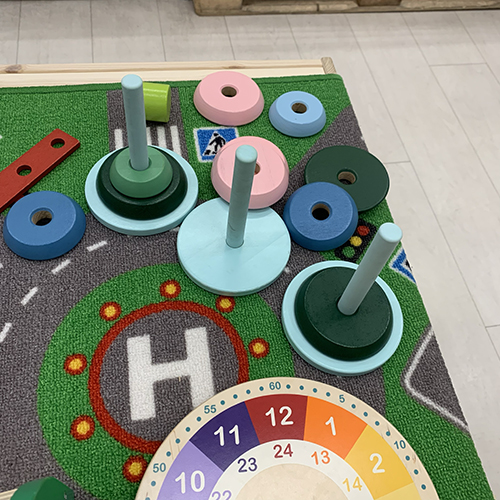
<p>이 제품은 IKEA의 UPPSTA라는 고리 쌓기 장난감이다.</p>

<p>프로그래머나 개발자라면 저 장난감이 ‘하노이의 탑’ 문제와 완전히 같다는 것을 한눈에 알 것이다.</p>

<p>영유아 장난감 하나로도 알고리즘을 이야기할 수 있고 흥미로운 문제를 떠올릴 수 있다. 그런데 굳이 어린 나이부터 코딩 학원이나 코딩 교육이 필요한 걸까? 그런 것은 고등학교나 대학교에서 배워도 늦지 않다고 생각한다. 어릴 때는 오히려 흔한 장난감을 통해 문제를 생각해보는 경험, 즉 ‘코딩’보다 ‘문제 풀이’라는 개념 자체에 자연스럽게 접근해나가는 것이 더 올바른 방향이 아닐까 싶다.</p>]]></content><author><name>DONGBUM KIM</name></author><category term="Programming" /><category term="programming" /><category term="algorithm" /><category term="하노이의탑" /><summary type="html"><![CDATA[이케아에서 아이가 가지고 놀던 고리 쌓기 장난감이 하노이의 탑과 같다는 걸 깨달으며, 어린 시절 코딩 교육에 대해 든 생각을 적었다.]]></summary></entry><entry><title type="html">워드프레스를 완전히 떠나며</title><link href="https://dongbum.io/2022/10/17/goodbye-wordpress" rel="alternate" type="text/html" title="워드프레스를 완전히 떠나며" /><published>2022-10-17T13:54:36+09:00</published><updated>2022-10-17T13:54:36+09:00</updated><id>https://dongbum.io/2022/10/17/goodbye-wordpress</id><content type="html" xml:base="https://dongbum.io/2022/10/17/goodbye-wordpress"><![CDATA[<h3 id="워드프레스와-15년">워드프레스와 15년</h3>

<p><img src="/assets/images/wordpress-logo.png" alt="" /></p>

<p>워드프레스를 쓰기 시작한 건 대략 15년 정도 된 것 같다. 정확히 언제였는지는 기억이 잘 나지 않는다. 처음에는 태터툴즈(지금의 티스토리 전신)를 썼었고, 이후 무버블타입(MT3)이나 soojung이라는 파일 기반 블로그 툴을 고민하다가 결국 가장 많이 사용되는 워드프레스를 선택했다. 그렇게 10여 년이 훌쩍 흘렀다.</p>

<h3 id="단점과-해킹">단점과 해킹</h3>

<p>PHP로 만들어진 워드프레스는 막강한 기능을 자랑하지만, 그 기능 때문에 너무나 복잡했다. 한 군데라도 잘못 건드리면 사이트가 먹통이 되기 일쑤라, 뭔가 고쳐보려 할 때마다 망설여지는 시스템이었다.</p>

<p>최근 트렌드는 HTML 기반의 정적(static) 사이트가 대세다. 이를 곰곰이 고민하다가 직접 내 사이트부터 전환해보았다. PHP를 쓰지 않으니 관리가 훨씬 편했다. 관리자 모드도 없어졌고, GitHub + Netlify를 통한 배포 방식이 정말 마음에 들었다.</p>

<p>아내의 비즈니스용 웹사이트는 워드프레스로 구축되어 AWS Lightsail 위에서 작동하고 있었는데, 얼마 전 들어가봤더니 해킹당한 것을 알게 되었다.</p>

<p><img src="/assets/images/hacking_1.png" alt="" /></p>

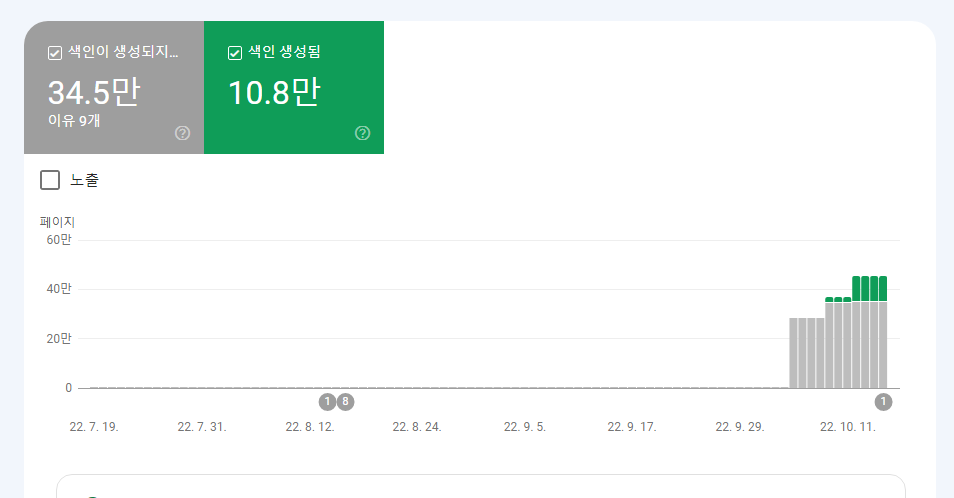
<p>구글 서치콘솔에 가보니 알 수 없는 35만 개의 페이지가 생성되어 있었다.</p>

<p><img src="/assets/images/hacking_2.png" alt="" /></p>

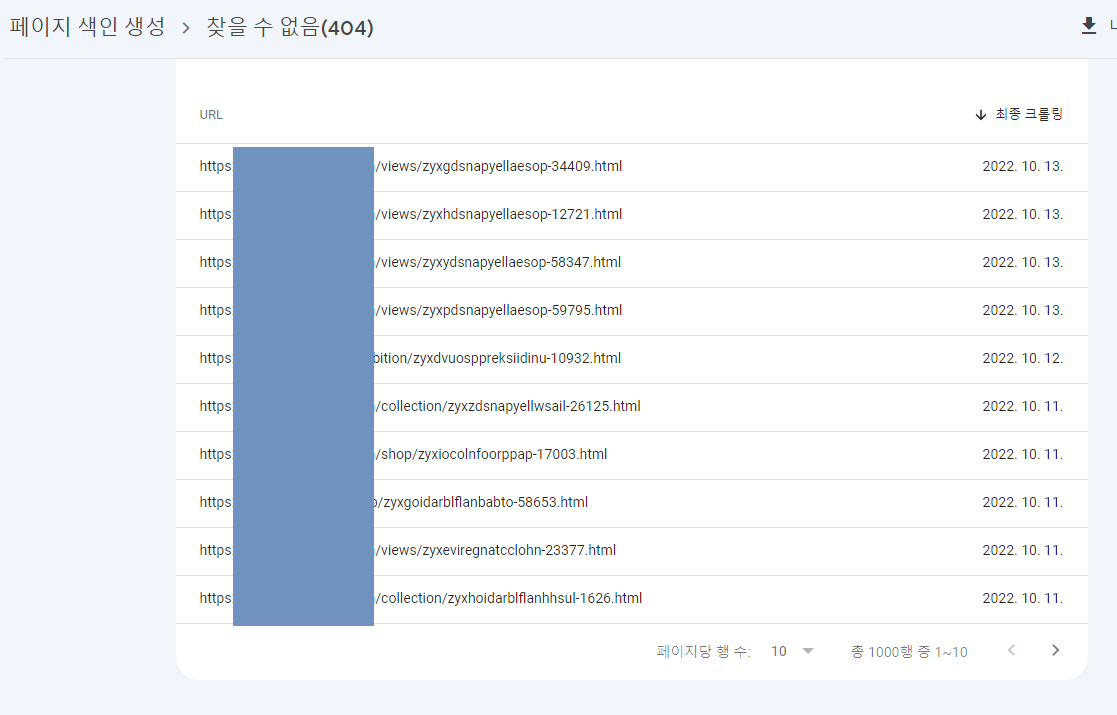
<p>URL을 보니 PHP 취약점 등을 이용해 자동으로 생성된 페이지였다.</p>

<p>사이트 자체는 접속이 되지 않는 상태였지만, 다행히 관리자 모드는 들어갈 수 있어서 자료를 살릴 수 있었다. 어차피 정적 자료를 관리하는 사이트라 PHP가 더 이상 필요하지 않다고 판단했다. 자료를 백업하고 Jekyll + Netlify 기반으로 재구축해 기존 자료를 다시 옮기는 데 3일이 걸렸다.</p>

<h3 id="netlify">Netlify</h3>

<p><img src="/assets/images/netlify-logo.png" alt="" /></p>

<p>GitHub + Netlify의 간단하고 편리한 사이트 빌드 시스템은 정말 마음에 든다.</p>

<p>정적 HTML 사이트로 전환하고 나니 해킹 위험은 거의 없어졌다. 워드프레스가 나쁜 건 아니었지만, 편하게 쓰기에는 너무 복잡했고 이런 해킹 위험까지 감수할 만큼 매력적인 시스템도 아니었다.</p>

<p>이제 Netlify 유료 플랜을 고민해볼 차례다.</p>]]></content><author><name>DONGBUM KIM</name></author><category term="WordPress" /><category term="wordpress" /><category term="php" /><category term="jekyll" /><category term="netlify" /><category term="static-site" /><summary type="html"><![CDATA[15년간 사용하던 워드프레스를 해킹 사건을 계기로 Jekyll + Netlify 기반의 정적 사이트로 전환한 경험을 정리했다.]]></summary></entry></feed>